How to Do Payroll Yourself for Your Business in 2026

Yes, you can do your own payroll for your small business, and you can even do it for free. With an Employer Identification Number, a few employee forms, and a repeatable process, you can run payroll yourself without paying for outside help. This guide walks you through every step, from setup to your first paycheck, so you can start today.
You have a few ways to get there. You can use a payroll template, do the math manually, or lean on payroll software. Most small business owners are surprised to learn how doable it really is once the setup is done.
Can I Do My Own Payroll for My Small Business?
Yes. Handling payroll involves a lot of moving parts. You need gross pay, overtime, deductions, taxes, and employee details. That volume is why many owners assume they cannot do it themselves.
It is time-consuming at first, but you get faster the more you do it. After a few cycles of practice, you can cut the time it takes to run payroll dramatically.
Before you touch employee taxes and withholding, you need to meet a few requirements. The first is an Employer Identification Number (EIN). It gives you the legal footing to file employee taxes and run payroll. You will also report some business information to federal and local authorities, which we cover below.
You generally have four ways to handle payroll:
- Use Real Check Stubs templates
- Use another online template
- Pay for payroll software
- Hire a service to run payroll for you

Is It Okay to Process My Own Payroll for a Small Business?
For most small businesses, yes. Picture a retail shop with five employees. Each one needs a paycheck, and you have tax and legal obligations tied to paying them. You cannot skip payroll, and outside help is often expensive money you could reinvest in the business.
Small business payroll is usually simpler than large company payroll because there are fewer transactions. So doing your own payroll is completely reasonable when your team is small.
Running payroll yourself can also help you catch fraud early. Payroll fraud tends to hit small businesses harder than large ones, and these schemes often go undetected for a year or more. Keeping a firm grip on your numbers helps protect your growing company against that risk.
How to Do Payroll Yourself (Step-by-Step Guide)
Doing payroll yourself takes some upfront work, but it is mostly front-loaded. The early tasks (getting an EIN, collecting W-2 and W-4 forms, Form I-9, and similar items) are usually one-time jobs. Once they are done, each payroll run gets much faster.
You cannot start processing payroll before these setup tasks are complete:
- Get an EIN
- Obtain your state business ID
- Collect important employee documents
- Choose a payroll schedule
- Get workers' compensation insurance
- Decide which benefits you will offer
- Open a payroll bank account
Get an EIN
A Social Security Number identifies an individual to the government. The business equivalent is the Employer Identification Number (EIN), also called a federal tax ID. You need one to file payroll taxes.
Applying is free using Form SS-4, online or by mail. Once issued, an EIN is permanent and cannot be revoked.
Obtain Your State Business ID
Most states and many local governments also require a tax identification number for income tax. Check with the relevant agencies in your area for the exact steps. Apply for your federal EIN first, since some states use it to identify your business.
Many states also require a state unemployment identification number (UIN). This is separate from your state income tax number, and you use it when you pay state unemployment tax. Employers pay these taxes on behalf of their employees.
Collect Important Employee Documents
Once setup is done, your employees need to complete some paperwork required by the government. The core documents are:
- Form W-4
- Form I-9
- State withholding certificates
Employees usually fill these out on or before their first day. They are required for payroll and used in other legal contexts too.
You will also prepare year-end documents like Form W-2 for each employee. For that, you need their current address and SSN. When the time comes, a W-2 form maker can help you generate accurate W-2s for your team quickly.
Choose the Right Payroll Schedule
You generally have four pay schedule options. The right one depends on your state rules and your team.
| Schedule | Paychecks per year | Common use |
|---|---|---|
| Weekly | 52 | Hourly and labor-heavy roles |
| Bi-weekly | 26 | Most common mix of hourly and salaried |
| Semi-monthly (twice a month) | 24 | Salaried staff |
| Monthly | 12 | Very small teams |
You may not have full freedom here. Some states and industries mandate specific pay frequencies. Manufacturing, for example, can carry stricter rules than the general standard. State law also affects when pay periods close and when employees must be paid.
Get Workers' Compensation Insurance
Workers' compensation is a state program that covers medical and rehabilitation costs when an employee is injured or becomes ill on the job. It helps replace part of their income while they recover and covers medical bills. If a worker dies from a work-related accident, the family may be eligible for benefits.
Most states require workers' compensation even if you have a single employee. You can buy coverage from the state, a commercial insurer, or a combination of both. When you file a claim, you report it to your state, and this cost is not deducted from payroll.
Decide Which Benefits You Will Offer
No matter your size, offering benefits improves how your business is seen. It helps you attract talent and keeps current employees happy.
Common benefits include health insurance, paid time off (PTO), paid holidays, education assistance, paid medical leave, and flexible spending accounts (FSAs) or health savings accounts (HSAs). Since the pandemic, many companies also offer flexible schedules and remote work, splitting hours between home and office.
Not all benefit costs come out of the business. You deduct a portion from each paycheck. How much you withhold depends on the benefits the employee chooses and at what level.
Open a Payroll Bank Account
Many businesses open a separate bank account just for paying employees and filing taxes. If you do this, use it only for payroll. It keeps your records cleaner and makes tracking payroll transactions far less stressful.
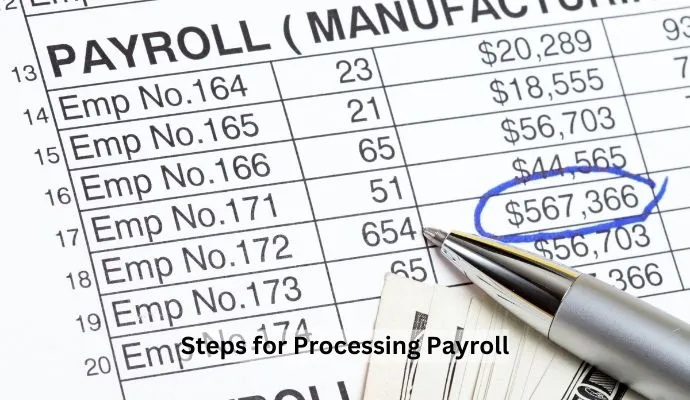
Steps for Processing Payroll
- Calculate working hours and gross wages
- Apply payroll deductions
- Pay employees after figuring net pay
- File your tax reports
- Keep payroll records
There are only five steps, but each has detail worth attention. Here is how each one works.
Step 1: Calculate Working Hours and Gross Wages
Start by totaling the hours each employee worked. Punch clocks, spreadsheets, and paper timesheets all work for tracking this.
Then calculate gross wages. Multiply each employee's pay rate by the hours they worked. Record tips and overtime for your nonexempt workers.
Your workweek can start and end whenever you choose, as long as it covers seven consecutive 24-hour periods. Overtime rules vary by state. California, for instance, requires overtime pay after eight hours in a single workday, not just after 40 hours in a week.
Step 2: Apply Payroll Deductions
After gross wages, move on to deductions. There are three types:
- Pre-tax deductions
- Statutory (tax) deductions
- Post-tax deductions
Pre-tax deductions include health benefits and 401(k) retirement contributions. Statutory deductions are where most of the tax work lives, including FICA, FUTA, federal and state income tax, Social Security, and Medicare. Post-tax deductions include things like IRA plans, court-ordered wage garnishments, and some union dues.
For 2026, the main federal payroll tax rates look like this:
| Tax | Employee rate | Employer rate | Wage base / limit (2026) |
|---|---|---|---|
| Social Security | 6.2% | 6.2% | First $184,500 of wages |
| Medicare | 1.45% | 1.45% | No limit |
| Additional Medicare | 0.9% | None | Wages over $200,000 |
| FUTA (unemployment) | None | 6.0%, often 0.6% after state credit | First $7,000 of wages |
Combined, FICA is 7.65% for the employee and 7.65% matched by the employer. The maximum Social Security tax per person is $11,439 in 2026. Most employers who pay state unemployment tax on time get a 5.4% credit that drops the effective FUTA rate to 0.6%, though a few states (such as California) carry higher rates due to federal loan credit reductions. A salary paycheck calculator can help you double-check these numbers.
Step 3: Pay Employees After Figuring Net Pay
Net pay is what remains after all deductions. You have several ways to pay employees, including direct deposit, check, or pay card. Make sure your method follows your state's rules.
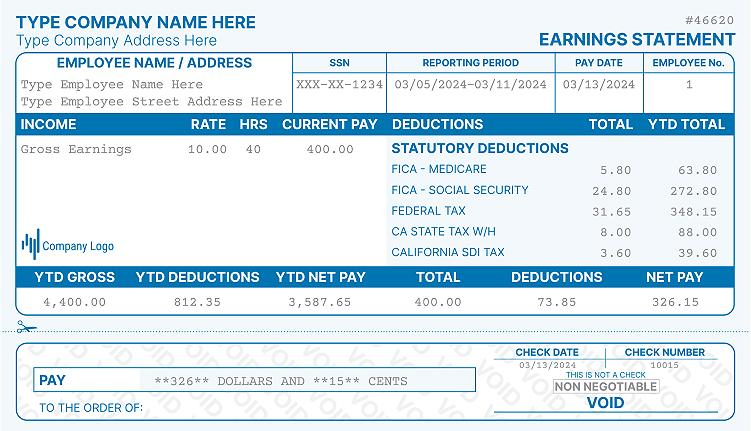
Many states require you to give employees a pay statement each payday. A pay stub generator makes this easy. You can create a check stub for every employee in minutes, with gross pay, deductions, and net pay laid out clearly.
Step 4: File Your Tax Reports
The tax work is not done after payday. Running a business means filing taxes with the IRS and local agencies. Form 941 covers FICA and federal income tax withholding each quarter.
For FUTA, you file Form 940 once a year, due January 31. State unemployment tax is filed separately, and the steps vary by state.
Step 5: Keep Payroll Records
Call it bookkeeping if you like, but this step saves you headaches later. Keep a record for each employee that includes:
- Employee name and SSN
- Home address
- Workweek details and hours worked
- Hourly pay rate and overtime pay
- Gross wages, deductions, and net pay
- Pay method and payment date
- Form W-4 and tax deductions
So how long do you need to keep payroll records? Keep them at least four years to satisfy IRS rules. The Department of Labor (under the FLSA) requires at least three years for basic payroll records. When in doubt, keep the longer period and follow any stricter local rules.
Pros and Cons of Doing Your Own Payroll
Doing your own payroll is a smart move for many small teams, but it has trade-offs.
The pros:
- No third party involved
- You control every calculation
- Less chance of bad data slipping in
- Easy to record changes in work hours
The cons:
- It takes time
- Mistakes are easier when you are rushed
How to Do Payroll With Payroll Software (Step-by-Step Guide)
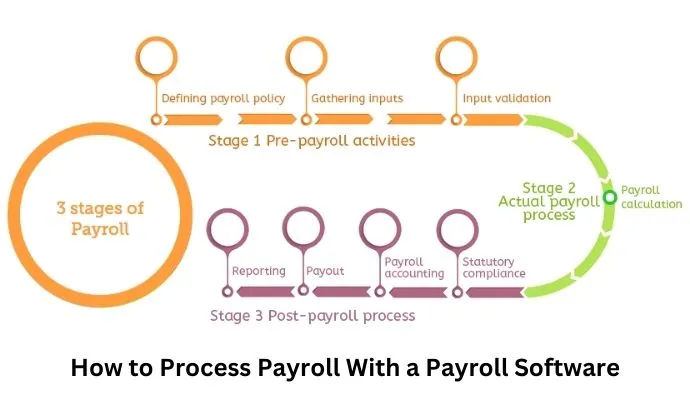
If you would rather not run payroll manually, software can handle the math for a monthly fee. There are many options, and you can compare the top payroll software solutions to find a fit. Here is the basic flow:
- Select your payroll software
- Set up a payroll policy for your business
- Add all employee information
- List the benefits you offer
- Choose how you will pay salaries
- Enter your tax details
- Pick the plan that fits your budget
Pros and Cons of Payroll Software
Pros:
- Accurate calculations
- On-time payments
- Less stress
- Easy tracking of extra costs
- Automatic generation of certain employee forms
Cons:
- Monthly cost may not suit the smallest teams
- You are trusting a third party with sensitive data
How Much Does It Cost to Do Payroll?
Cost depends on the method you pick. Here is a quick comparison to help you decide.
| Method | Typical cost | Best for |
|---|---|---|
| Manual / DIY | Free to low (your time) | 1 to a few employees |
| Payroll software | Monthly base fee plus per-employee fee | Growing teams that want automation |
| Payroll service | Higher monthly fee | Owners who want it fully handled |
If you have one employee or a very small team, doing payroll yourself can cost almost nothing beyond your time.
Should You Automate Payroll?
For most small businesses, yes. Automating payroll saves time and helps employees get paid without delays. Even a basic system reduces the chance of a math error. As your team grows, automation usually pays for itself.
When Should You Hand Payroll to a Service Provider?
You will not run payroll yourself forever. As your business grows, other tasks compete for your attention. That is the point to consider a payroll service provider, which can save you significant time and stress.
Is a Payroll Service Worth It?
A payroll service is worth it when you choose the right provider. Pick the wrong one and it can become a costly mistake. Compare reviews, pricing, and support before you commit.
Common Payroll Mistakes to Avoid
Payroll is detailed work, so errors are common. Watch out for these:
- Misclassifying worker status (employee vs contractor)
- Not updating W-2 and W-4 forms
- Inaccurate tax deductions
- Over-withholding taxes
- Missing payment dates for taxes or net pay
Frequently Asked Questions (FAQs)
Can I do my own payroll for free?
Yes. You can do your own payroll for free by tracking hours, calculating taxes, and paying employees yourself. The guide above walks through each step.
Can I do payroll manually?
Yes. You can do payroll manually with a spreadsheet or template. It takes more time than software, but it is a valid option, especially for a tiny team.
How do I set up payroll for one employee?
Setting up payroll for one employee follows the same steps as a small business. You still need an EIN, the right forms, and a pay schedule. It simply takes less time.
How do I do payroll in Excel?
Start with a payroll template that matches your needs. Enter hours and pay rates, apply deductions, then calculate net pay before paying your employees.
How do I do payroll for an S corp?
An S corp owner who works in the business must pay themselves a reasonable salary through payroll. The steps are the same as above, plus you withhold and report taxes on the owner's wages.
Final Thoughts on Running Payroll Yourself
Running your own payroll is a practical choice for many small businesses. It takes some time, but with the calculations in your hands, there is little to fear. The steps are numerous yet straightforward. Pick the method that fits you best, keep your pay stub records clean, and avoid the common mistakes above.

Kristen Larson is a payroll specialist with over 10 years of experience in the field. She received her Bachelor's degree in Business Administration from the University of Minnesota. Kristen has dedicated her career to helping organizations effectively manage their payroll processes with Real Check Stubs.
Our all Posts